
Reverse vs. Regenerate vs. Resubmit
How to Correct Claims the Right Way
Understanding the Big Picture
In Motivity, correcting a claim isn’t a one-size-fits-all action. The right choice depends on where the claim is in its lifecycle:
- Has it already been sent and processed by the payer?
- Was the issue caused by incorrect setup vs. data entry?
- Do you need to completely restart the claim, or just fix and resend it?
The three available actions Reverse, Regenerate, and Resubmit each serve a different purpose within that lifecycle.
Reverse (Voiding a Claim)

Billing > Posted Invoices
Main use: if claims were submitted to the wrong funder.
When you reverse a claim, you are essentially removing the billing process entirely from the Motivity platform. The system voids the claim and returns the services back to Unbilled Services, allowing you to rebuild and rebill the claim from scratch. Note: This action does not void the claim with the funder.
This action is best used when the claim was fundamentally incorrect at the time it was created and did not make it to the funder (rejected). For example, if the wrong payer and authorization was used, reversing allows you to correct those issues cleanly rather than trying to patch them on an already billed claim.
👉 That said, reversing should be used thoughtfully. In many cases, it’s better to wait for the payer’s response (ERA/EOB) and make corrections during payment posting instead. This keeps your workflow aligned and avoids creating duplicate or unnecessary claim activity. Additionally, before reversing, you should always verify that your contract configuration and billing setup are correct, so the same issue doesn’t happen again on rebill.
To reverse a claim
- Navigate to the Billing module
- Select the Posted Invoices subtab
- Locate and select the claim you need to reverse
- Select the Reverse option
- When prompted, confirm the reversal
- Once confirmed, the claim is removed from active billing
- The services are then moved back to Unbilled Services
- The claim is now ready to be billed again with the corrected information
Regenerate (Rebuilding the Claim with Updated Data)
Billing > Posted Invoices
Mainly used for correcting rejections
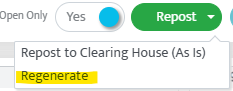
Regenerating a claim is a more subtle action that is also used when the claim has not yet made it to the funder. Instead of voiding the claim, it rebuilds the claim using updated system data, such as contract rates, modifiers, or billing provider configurations.
This is most useful when the issue wasn’t with the original service itself, but rather with backend setup. For example, if you updated a contract rate, corrected a modifier mapping, or fixed NPI configuration after the claim was created, regenerating allows the claim to reflect those updates without fully reversing it.
Think of regeneration as a system refresh rather than a correction tied to payer communication. It ensures the claim aligns with the most current configuration before being sent or resent.
It’s important to note that regeneration does not inherently communicate anything to the payer on its own. Instead, it is often part of the process leading into a resubmission, where the corrected claim is actually sent out again.
Resubmit (Correcting and Sending to the Payer Again)
Collections > Check > Patient > Invoice
Used for sending corrected claims

Resubmitting is the action used when a claim has already been processed by the payer and needs to be corrected and sent again. Unlike reversing, resubmission keeps the claim tied to its original submission and communicates to the payer that this is a corrected claim, not a brand-new one.
When you resubmit a claim in Motivity, the system generates a new version of the claim that includes:
- A resubmission code (frequency code 7)
- A reference to the original claim ID
This is critical for payers, as it ensures they properly link the corrected claim to the original and process it accordingly.
Resubmission is the most appropriate option when dealing with:
- Denied claims
- Underpaid claims requiring correction
- Minor to moderate updates (units, modifiers, diagnosis, etc.)
- Any situation where the payer has already interacted with the claim
Before resubmitting, all necessary corrections should be made. This may involve updating contracts, authorizations, or even editing the appointment directly from the Collections module using the pencil icon. Once updates are complete, selecting Resubmit will regenerate and send the corrected claim to the clearinghouse.
How to Choose the Right Action
The easiest way to think about these options is to focus on intent:
- If the claim rejected (never reached the funder) and you need to completely undo the claim and start over, use Reverse
- If the claim rejected (never reached the funder) and you need the claim to reflect updated system setup or updated claim data, use Regenerate
- If the claim has already been processed and paid, but needs to be corrected and sent again, use Resubmit
In practice, most billing workflows rely heavily on Resubmit, since it maintains continuity with the payer and avoids unnecessary disruption. Reverse should be reserved for larger issues, while Regenerate supports behind-the-scenes corrections that ensure accuracy before submission.
You have made it to the end of our Motivity Billing 101 series!
Last Updated: 4/22/26 by Kayla Lewis