
Overview
Prescribed metrics give clinicians and supervisors a clear, real-time view of treatment integrity by comparing what was planned to be run in a session against what was actually run. These metrics are displayed alongside existing session data, making it easy to see at a glance whether data collectors are meeting the expectations set in each learner's treatment plan. This article covers how prescribed metrics are defined, what is included at the session level, and a few special cases to keep in mind.
What Is a Prescribed Target?
A target is considered prescribed in a session only when it meets both of the following criteria:
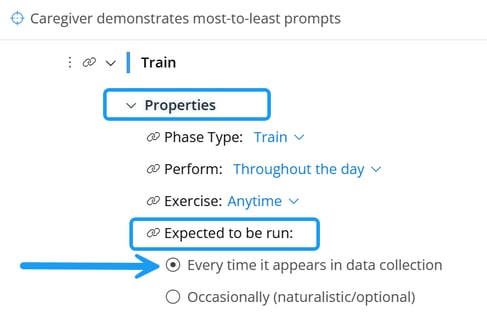
- It is set as expected to be run every time it appears in data collection (non-optional)
- This can be set in the program builder. To learn more, see the Expected to Be Run article.
- It is available to the staff member at the beginning of the session (or at the start of the day, for daily data)
Targets that are set to "Occasionally (naturalistic/optional)", or that are added or transitioned after a session has already started, are not included. This prevents the system from holding data collectors accountable for targets that may not have been appropriate or possible to run given the circumstances.
Session-Level Prescribed Metrics
Each session includes the following metrics. The count metrics are set at the beginning of the session and do not change. The percentage metrics update in real time as data are collected.
Prescribed Programs
- Number of Prescribed Programs — Count of programs with at least one prescribed target in the session
- Percent of Prescribed Programs Run — (Programs Run ÷ Prescribed Programs) × 100; displayed as a percentage and progress bar
Prescribed Targets
- Number of Prescribed Targets — Count of all targets meeting the prescribed definition for the session
- Percent of Prescribed Targets Run — (Targets Run ÷ Prescribed Targets) × 100; displayed as a percentage and progress bar
Prescribed Trials
- Number of Prescribed Trials — Sum of the minimum trial counts for all prescribed targets in the session
- Percent of Prescribed Trials Run — (Trials Run for Prescribed Targets ÷ Prescribed Trials) × 100; displayed as a percentage and progress bar
- Note: This metric can exceed 100% when more trials are run than the prescribed minimum.
Trial Count Adherence Trial Count Adherence measures the degree to which data collectors are meeting the recommended number of teaching trials for each goal. See the dedicated Trial Count Adherence article for full details.
How Prescribed Metrics Are Displayed
Prescribed metrics appear alongside existing session metrics (such as total goals run) for easy comparison. Keep in mind that existing "goals run" metrics include both prescribed and non-prescribed targets, while prescribed metrics reflect prescribed targets only.
Example: A session has 10 prescribed targets. The data collector runs 9 prescribed targets, 1 "occasional" target, and 1 target added mid-session.
| Metric | Value |
|---|---|
| Targets Run (existing metric) | 11 (9 + 1 + 1) |
| Targets Prescribed | 10 |
| Percent of Prescribed Targets Run | 90% (9 ÷ 10) |
Special Cases
- Scheduled targets — A target on a schedule is only included in metrics when it appears in the session
- Targets added mid-session — Targets introduced via manual transition or concurrency rules after a session starts are not included in prescribed metrics
- Phase transitions mid-session — Only data from the original phase is included; the new phase applies to future sessions
- Settings changes mid-session — Only the original program settings are used for that session's metrics; updated settings apply to future sessions
Last Updated: 5/29/26 by Tatum Winslow