
Claim Configuration Settings – Contract Details
The Contract Details subtab within the Contracts module is a critical component of the Motivity practice management system. It defines how claims are generated, formatted, and submitted to funders. Proper configuration ensures clean claim submission, accurate reimbursement, and alignment with payer requirements.

Below is a detailed breakdown of each configuration field, what it controls, and why it matters.
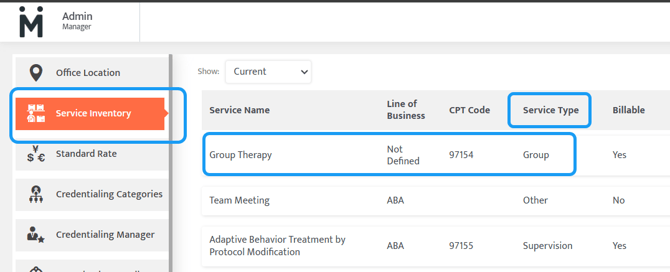
1. Service Type (Admin → Service Inventory)
What It Means:
The Service Type categorizes the type of service being provided (e.g., therapy, assessment, supervision).
Configuration Considerations:
While this field is configured in the Admin → Service Inventory module, it directly impacts billing and payroll when services are tied to contracts.
Why It Matters:
Accurate categorization is essential for reporting and payroll. For example, if group therapy codes such as 97154 or 97158 are incorrectly categorized as Therapy instead of their appropriate grouping, payroll discrepancies can occur.
Important: Once a service is added to a contract, the Service Type cannot be changed. Ensuring accuracy during initial setup is critical.
2. Time Rounding
What It Means:
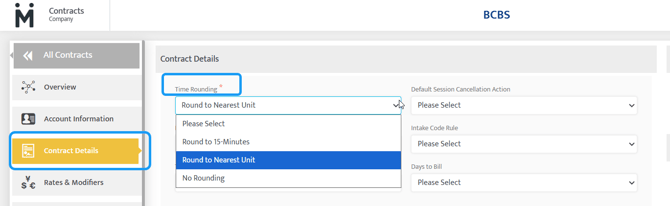
Determines how service time is converted into billable units.
Configuration Options:
- Round to Nearest Unit: Time exceeding 7 minutes rounds up to the next unit.
- Round to 15 Minutes: Time must reach a full 15 minutes to count as one unit; anything less will not generate a unit.
Why It Matters:
This setting directly impacts billing accuracy and reimbursement. Incorrect rounding rules can result in underbilling or overbilling, both of which can lead to revenue loss or compliance issues.
3. NPI Used in Claims (Required)
What It Means:
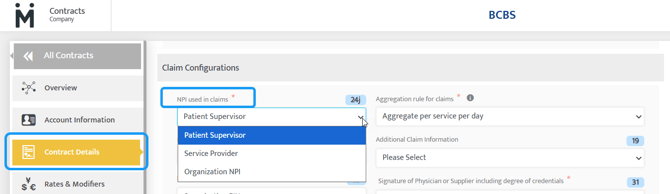
Specifies which National Provider Identifier (NPI) will populate Box 24J on the CMS-1500 claim form.
Configuration Options:
- Patient Supervisor: Uses the supervising provider’s NPI
- Service Provider: Uses the rendering provider’s NPI
- Organization NPI: Uses the group or organizational NPI
Why It Matters:
Selecting the correct NPI is essential for payer compliance. Many funders have strict requirements regarding whether claims must be billed under a supervising provider versus the rendering provider. Incorrect selection can result in claim denials or delays.
4. Aggregation Rule for Claims (Required)
What It Means:
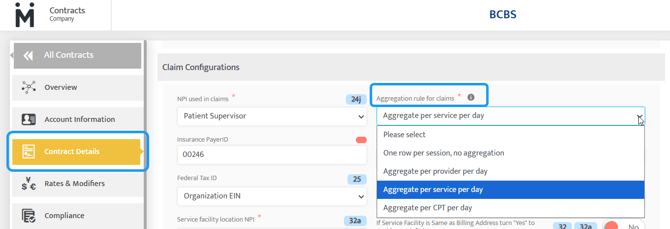
Defines how services are grouped (or not grouped) when displayed on the CMS-1500 claim form.
Configuration Options:
- One Row Per Session, No Aggregation: Each service appears on its own line
- Aggregate Per Provider Per Day: Combines all services for the same provider and patient on a given day
- Aggregate Per Service Per Day: Combines services by service type (splits only by modifiers)
- Aggregate Per CPT Per Day: Combines services by CPT code (splits only by modifiers)
Why It Matters:
Aggregation impacts how claims are presented to payers. Some funders require detailed line-by-line billing, while others prefer consolidated claims. Incorrect aggregation can cause rejections or require manual rework.
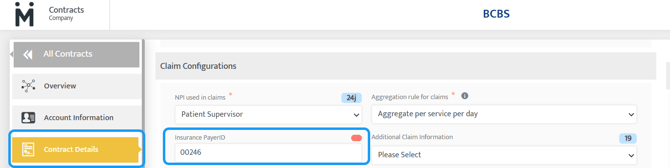
5. Insurance Payer ID (Required)
What It Means:
The payer ID assigned by your clearinghouse for electronic claim submission.
Configuration Options:
- No selectable options; this is entered manually based on clearinghouse data.
Why It Matters:
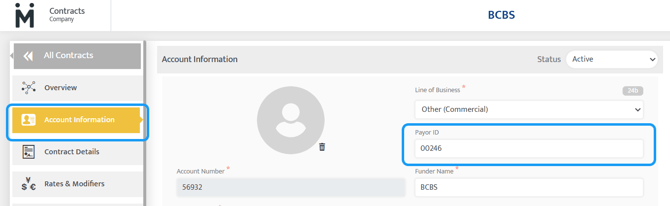
The Payer ID must match exactly with the one listed in the Account Information subtab. A mismatch will result in claim submission failures or rejections at the clearinghouse level.
6. Additional Claim Information
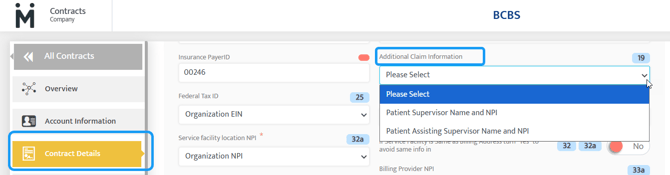
What It Means:
Allows inclusion of supplemental provider information required by certain funders.
Configuration Options:
- Patient Supervisor Name and NPI: Adds supervising provider details to Box 19
- Patient Assisting Supervisor Name and NPI: Adds assisting supervisor details to Box 19
Why It Matters:
Some payers require additional provider details beyond standard fields. Including this information proactively can prevent delays, denials, or requests for additional documentation.
7. Federal Tax ID
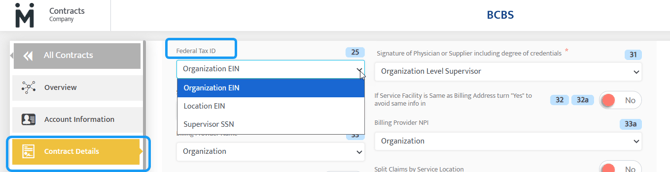
What It Means:
Determines which tax identification number is reported in Box 25 on the CMS-1500 claim form.
Configuration Options:
- Organization EIN: Uses the organization’s tax ID
- Location EIN: Uses the specific facility’s tax ID
- Supervisor SSN: Uses the supervising provider’s Social Security Number
Why It Matters:
The selected tax ID must align with how the provider is credentialed with the payer. Incorrect configuration can lead to claim denials or payment being issued incorrectly.
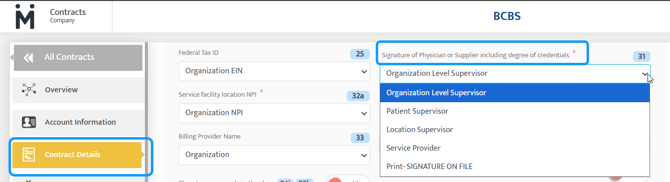
8. Signature of Physician or Supplier (Required)
What It Means:
Controls what appears in Box 31 of the CMS-1500 claim form, which verifies the accuracy of the claim.
Configuration Options:
- Organization Level Supervisor: Pulls from Admin → Organization Details
- Patient Supervisor: Uses supervising provider’s credentials
- Location Supervisor: Uses location supervisor’s credentials
- Service Provider: Uses rendering provider’s credentials
- Print “Signature on File”: Displays “Signature on File” instead of a name
Why It Matters:
Box 31 is a required field for claim validation. Choosing the correct signature source ensures compliance with payer requirements and avoids claim rejections.
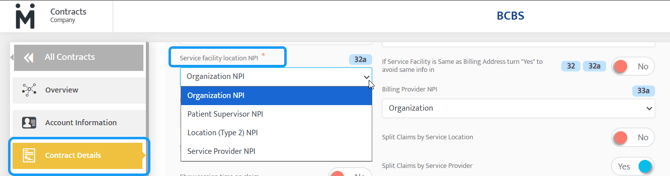
9. Service Facility NPI (Box 32a) (Required)
What It Means:
Determines which National Provider Identifier (NPI) is reported in Box 32a of the CMS-1500 claim form. This field identifies the NPI of the location where services were rendered.
Configuration Options:
- Organization NPI: Uses the organization’s NPI
- Patient Supervisor NPI: Uses the supervising provider’s NPI
- Location NPI: Uses the NPI associated with the service location
- Service Provider NPI: Uses the rendering provider’s NPI
Why It Matters:
Box 32a must accurately reflect the service facility associated with the claim. Many payers require the Location NPI when services are tied to a specific facility, while others may accept the organization or rendering provider. Incorrect configuration can lead to claim rejections or misrouting of payments.
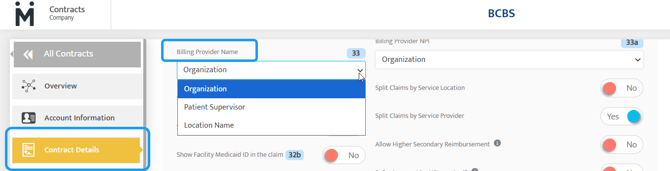
10. Billing Provider Name (Box 33) (Required)
What It Means:
Specifies which entity name will appear in Box 33 of the CMS-1500 claim form. This represents the billing provider submitting the claim.
Configuration Options:
- Organization: Displays the organization or group name
- Patient Supervisor: Displays the supervising provider’s name
- Location Name: Displays the name of the service location
Why It Matters:
The Billing Provider Name must align with how the provider is credentialed with the payer. For example, if the organization is enrolled as the billing entity, selecting an individual provider instead could result in claim denials or processing delays.
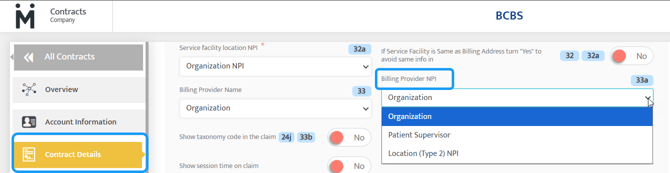
11. Billing Provider NPI (Box 33a) (Required)
What It Means:
Determines which NPI is populated in Box 33a of the CMS-1500 claim form, corresponding to the billing provider listed in Box 33.
Configuration Options:
- Organization NPI: Uses the organization’s NPI
- Patient Supervisor NPI: Uses the supervising provider’s NPI
- Location NPI: Uses the NPI associated with the service location
Why It Matters:
Box 33a must match the Billing Provider Name selected in Box 33 and align with payer credentialing records. A mismatch between the billing name and NPI, or inconsistency with payer enrollment, is a common cause of claim denials and rejections.
Next Steps: Now that you have confirmed your required contract details, walk through claim submission in our Motivity Billing 101: Submitting Claims article.
Last Updated: 4/22/26 by Kayla Lewis